Welcome, aspiring and seasoned network engineers! In the intricate world of network design and management, understanding IP subnetting is not just a skill—it’s a fundamental necessity. Navigating IP addresses, subnet masks, and CIDR notations can feel like deciphering a secret code, but with the right tools and knowledge, it becomes second nature.
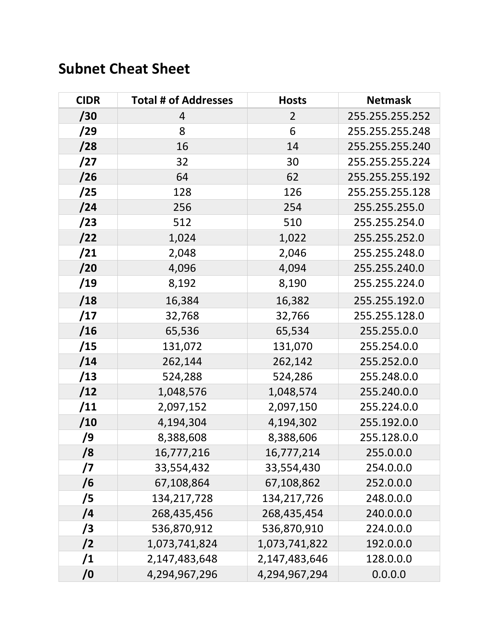
This guide aims to be your definitive ‘Subnet Cheat Sheet,’ providing a clear, step-by-step methodology to demystify subnetting. It solves the common problem of quickly and accurately segmenting networks, optimizing IP address allocation, and enhancing network security and performance. Forget the guesswork; embrace precision.
Why is this so important? Proper subnetting allows for efficient use of IP addresses, reduces network congestion by creating smaller broadcast domains, and enhances security by isolating different network segments. It’s the backbone of scalable and well-performing networks, from small office setups to vast enterprise infrastructures.
Before we dive deep, let’s ensure you have the foundational knowledge and tools ready. While this guide will cover the essentials, a basic understanding of computer networking concepts will be beneficial.
- Basic Understanding of IP Addressing: Familiarity with IPv4 addresses (e.g., 192.168.1.1) and their dotted-decimal notation.
- Binary and Decimal Number Systems: The ability to convert between binary (base-2) and decimal (base-10) is crucial, though we’ll review it.
- Pencil and Paper/Whiteboard: Essential for manual calculations and visualizing the bits.
- Calculator (Optional, for verification): A standard scientific calculator or an online subnet calculator can verify your manual work, but don’t rely on it for learning.
- Patience and Practice: Subnetting is a skill that improves with repetition.
Let’s start with the very basics: an IPv4 address is a 32-bit number, typically represented in dotted-decimal format (e.g., 192.168.1.1). It’s divided into four 8-bit sections, known as octets. Each octet can range from 0 to 255.
The core idea behind subnetting is to divide a larger network into smaller, more manageable sub-networks. This is achieved by ‘borrowing’ bits from the host portion of an IP address to create additional network bits, thus defining new subnets.
- Network Address: The first address in a subnet, where all host bits are ‘0’. It identifies the subnet itself and cannot be assigned to a host.
- Broadcast Address: The last address in a subnet, where all host bits are ‘1’. It’s used to send data to all devices within that specific subnet and cannot be assigned to a host.
- Host Range: The range of usable IP addresses within a subnet, excluding the network and broadcast addresses. These are the addresses you can assign to devices.
- Subnet Mask: A 32-bit number that distinguishes the network portion of an IP address from the host portion. It’s represented in dotted-decimal (e.g., 255.255.255.0) or CIDR notation.
- CIDR Notation (Classless Inter-Domain Routing): A concise way to represent the subnet mask by indicating the number of network bits (e.g., /24 for 255.255.255.0).
The Steps: Your Go-To Subnetting Guide
Step 1: Understand Binary-to-Decimal Conversion (and vice-versa)
Each octet consists of 8 bits, each with a positional value: 128, 64, 32, 16, 8, 4, 2, 1 (from left to right). To convert binary to decimal, sum the positional values where a ‘1’ appears. For example, 11000000 is 128+64 = 192. To convert decimal to binary, find the largest positional value less than or equal to your number, subtract it, mark a ‘1’, and repeat.
Example: Convert 172 to binary. 172 – 128 = 44 (1xxxxxxx). 44 – 32 = 12 (11xxxxxx). 12 – 8 = 4 (1101xxxx). 4 – 4 = 0 (11011xxx). Result: 10101100.
Step 2: Recognize Default Subnet Masks and Classes
Historically, IP addresses were categorized into classes (A, B, C) with default subnet masks. While CIDR has largely replaced classful addressing, understanding these defaults helps. A Class A network uses /8 (255.0.0.0), Class B uses /16 (255.255.0.0), and Class C uses /24 (255.255.255.0). The ‘1’s in the subnet mask represent the network portion, and ‘0’s represent the host portion.
When you ‘subnet,’ you’re essentially extending the network portion of the mask by changing some ‘0’s to ‘1’s, thereby shrinking the host portion.
Step 3: Determine the Number of Network and Host Bits from CIDR
The CIDR notation /N directly tells you that the first N bits are network bits, and the remaining (32 - N) bits are host bits. For example, a /27 mask means 27 network bits and 5 host bits.
Knowing the number of host bits (h) allows you to calculate the number of usable hosts: (2^h - 2). The -2 accounts for the network and broadcast addresses, which are unusable by hosts.
Step 4: Calculate the Number of Subnets Created
When you borrow s bits from the host portion to create subnets, the number of new subnets created is 2^s. For instance, if you start with a /24 and use 3 bits for subnetting (making it a /27), you’ve created 2^3 = 8 subnets.
Step 5: Find the Subnet Mask in Dotted-Decimal
Convert the CIDR notation (e.g., /27) into its dotted-decimal equivalent. For /27, you have 27 ‘1’s. This means three full octets of ‘1’s (255.255.255) and three ‘1’s in the fourth octet (128+64+32 = 224). So, /27 is 255.255.255.224.
Step 6: Use the ‘Magic Number’ Method (Block Size)
This is a quick way to determine the size of each subnet. The ‘magic number’ is found by subtracting the last non-255 octet of the subnet mask from 256. For a /27 (mask 255.255.255.224), the magic number is 256 – 224 = 32. This means each subnet will increment by 32 in the last octet.
The network addresses for the /27 example would be 0, 32, 64, 96, 128, 160, 192, 224 within the fourth octet.
Step 7: Identify Network Address, Broadcast Address, and Host Range for a Specific IP
- Identify the Subnet Network Address: Use the ‘magic number’ (block size) to find the nearest multiple that is less than or equal to the IP address’s octet where the subnetting occurs. For an IP like 192.168.1.75 with a /27 mask (magic number 32), the multiples are 0, 32, 64, 96… The closest multiple without exceeding 75 is 64. So, the network address is 192.168.1.64.
- Identify the Broadcast Address: The broadcast address for a subnet is one less than the next subnet’s network address. For 192.168.1.64/27, the next subnet starts at 192.168.1.96. So, the broadcast address is 192.168.1.95.
- Identify the Usable Host Range: This is the range between the network address and the broadcast address, excluding both. For 192.168.1.64/27, the usable host range is 192.168.1.65 to 192.168.1.94.
Step 8: Practical Example Walkthrough (192.168.1.0/27)
Let’s subnet the network 192.168.1.0 with a /27 mask.
Given: Network ID 192.168.1.0, CIDR /27
- Subnet Mask: /27 means 27 network bits. The first three octets are 255.255.255. The fourth octet has 3 ‘1’s (11100000), which is 128+64+32 = 224. So, the mask is 255.255.255.224.
- Number of Host Bits (h): 32 – 27 = 5 host bits.
- Number of Usable Hosts per Subnet: 2^5 – 2 = 32 – 2 = 30 hosts.
- Number of Subnets (s): Compared to a /24 (default Class C), we borrowed 3 bits (27-24=3). So, 2^3 = 8 subnets.
- Magic Number (Block Size): 256 – 224 = 32.
- Subnet 0: Network: 192.168.1.0, Hosts: 192.168.1.1 – 192.168.1.30, Broadcast: 192.168.1.31
- Subnet 1: Network: 192.168.1.32, Hosts: 192.168.1.33 – 192.168.1.62, Broadcast: 192.168.1.63
- Subnet 2: Network: 192.168.1.64, Hosts: 192.168.1.65 – 192.168.1.94, Broadcast: 192.168.1.95
- …and so on, incrementing by 32 for each subsequent subnet’s network address.
Step 9: Briefly Understand Variable Length Subnet Masking (VLSM)
VLSM allows you to use different subnet masks for different subnets within the same classful network. This is crucial for efficient IP address allocation, especially for links that only need two host IPs (e.g., point-to-point links using /30). VLSM is an extension of basic subnetting, applying the same principles but with varying subnet masks across segments.
- Off-by-One Errors: A frequent mistake. Always double-check your host range calculations, ensuring you correctly exclude the network and broadcast addresses.
- Forgetting Network/Broadcast Addresses: Remember that the first and last addresses in any subnet are reserved and cannot be assigned to hosts.
- Incorrect Binary Conversion: Practice converting between binary and decimal until it’s second nature. A single bit error can throw off your entire calculation.
- Misunderstanding CIDR: Ensure you know what the ‘/N’ truly represents (number of network bits) and how it dictates the subnet mask.
- VLSM Complexity: When dealing with VLSM, always start with the largest subnet requirements first, then work your way down to smaller ones to avoid overlap and maximize efficiency.
- Not Practicing Enough: Subnetting isn’t a theory you read once; it’s a skill you build through consistent practice.
Building Your Own Cheat Sheet: What to Include
A good subnet cheat sheet typically includes: common CIDR values (/24 to /30), their corresponding subnet masks, the number of host bits, the number of usable hosts, and the block size (magic number). You might also include a quick binary-to-decimal conversion table for reference.
Keep it concise but comprehensive. The goal is to quickly recall critical values, not to re-learn the entire process every time.
Conclusion: Empower Your Network Engineering Journey
Mastering subnetting is a cornerstone of effective network engineering. It empowers you to design robust, efficient, and secure networks. While it might seem daunting at first, consistent practice with this step-by-step guide will transform you into a subnetting wizard.
Don’t just read this guide; actively work through the examples. Take an IP address, pick a CIDR, and calculate all the parameters manually. Then, use an online calculator to verify your answers. The more you practice, the more intuitive subnetting will become. Embrace the challenge, and watch your networking skills soar!
